Use our app to view your energy consumption data!
In the Vaasan Sähkö app and online service you can follow your own energy consumption, your invoices and contract information whether you are an electricity our district heating customer.
Mobile App and online service
Following your consumption and making even small changes in your consumer habits can give you significant savings. It’s easier to get savings when you are familiar with where and when energy is consumed in your household.
In our mobile app and online service, you can check your consumption data at 15-minute intervals and also compare it with the situation, for example, a month or a year ago. The consumption data is available from all your places of use.

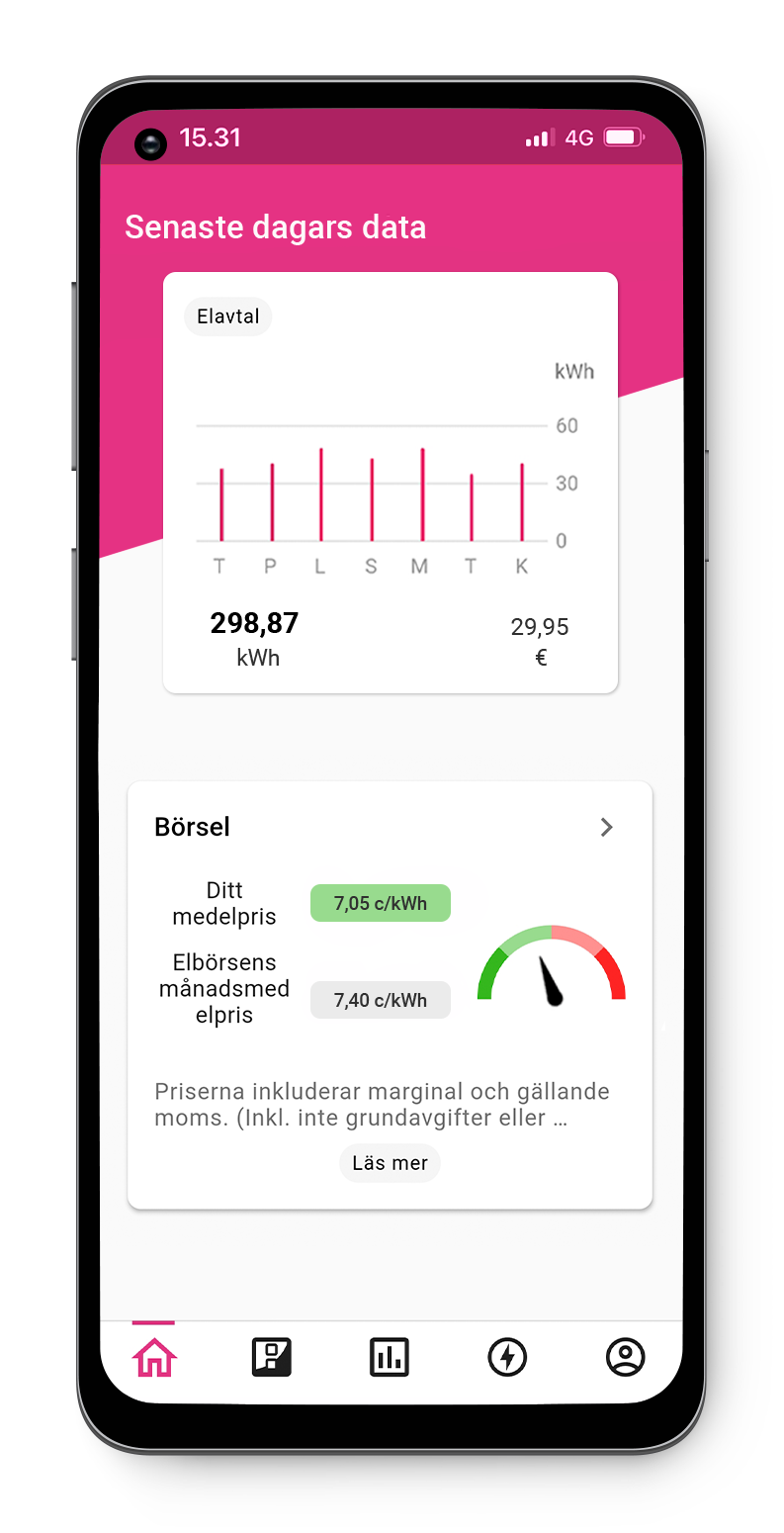
download Vaasan sähkö mobile app
- Use your bank credentials or a mobile certificate to enable the app
- You can log in with the same user-id to our online service and mobile app
- The mobile app can be used by both consumer and corporate customers.
- Check the compatibility in your app store.


Log in to our online service
- Log in to the online service with the user-id you’ve created.
- When logging in for the first time, you need to use strong identification.
- The service is available for consumer, corporate and housing company customers.

Manage your energy matters easily with the app
Consumption reports covering time periods from 15 minutes to years
You can even track electricity consumption and its costs on a 15-minute basis. Monitoring consumption makes it easy to find ways of reducing your energy bills.
Easy comparison
Compare your consumption with previous years and outdoor temperatures. You can use the app to view consumption data for periods ranging from the previous day to three years ago.
What’s gone wrong?
Check for faults and outages in the Vaasan Sähköverkko area.
Frequently asked questions
Authentication or username creation fails
If you’re having trouble with authentication, please try again later.
If authentication succeeds but username creation fails, please contact our customer service.
Why are banking credentials required for registration?
We need to verify who you are so that you can view your information in the app. Strong authentication is implemented using Telia’s authentication service, and your banking credentials will not be passed on to us at any stage of the authentication process.
Login fails
Check that you’ve entered your username and password correctly. If necessary, you can also request a new password via the Forgot your password? link. If you have requested a new password and it doesn’t seem to arrive, remember to also check the junk mail folder in your email.
The same login information works for both the app and the online service. If you’re unable to log in and you can’t reset your password via the Forgot your password? link, please contact our customer service.
My email address has changed, and I can no longer log in. What should I do?
Please contact our customer service so that we can update your new email address in your login details.
I’ve forgotten my password, but I didn’t get a password reset message
It may take up to 15 minutes to receive the reset message. The message may also have ended up in the spam folder.
If you still don’t receive or find the message, you have probably not yet registered as a user, or you may have used a different email address when registering. If you do not remember which email address you registered with or your email address has changed, please contact our customer service.
Why do I see two different contracts for the same address?
Your electricity contract always consists of two parts: the contract you have concluded with Vaasan Sähkö and the contract you have concluded with Vaasan Sähköverkko. The Vaasan Sähkö contract applies to the energy you use, while the Vaasan Sähköverkko contract applies to electricity transmission.
Why’s there a delay in updating my consumption data?
You see your consumption data in the app with a delay of one or more days, as your consumption data is retrieved from remotely readable meters once a day. Unfortunately, it’s not possible to monitor consumption in real time.
Your consumption data is received by us from your distribution company. Occasionally, there may be delays in the delivery, which is why the data may be missing or based on estimates. For example, if your electricity meter has been replaced or if you have installed solar panels, it may cause a delay in data updates. Intermittent disruptions in meter remote reading can also cause delays. Typically, such situations resolve themselves within a couple of weeks or even sooner and do not require you to contact us.
Why isn’t my consumption data visible?
If your consumption data isn’t visible in the app, please contact our customer service.
I have a production contract. Why can’t I see my production figures in the app?
The app only shows the part of your production that’s sent to the power grid. This means the part of your production that you sell to us.
Can I view district heating contract information in the app?
Yes. You can view your district heating contract and consumption data in the app.
Why can’t I see my contract?
In the app, you can see the contracts in which you are a contract customer or contract partner. If you can’t see your information when you log in to the online service for the first time, it may help to log out and back in.
Your contracts may also be under different customer numbers. Change the customer number and check the contracts with different customer numbers. In the application, customer numbers can be found in the upper right corner, in the online service in the lower left corner.
Why doesn’t the cost amount displayed in the app match the bill?
The cost amount in the app may not match the bill for the following reasons:
- The time period is not the same. Check that you’ve selected the time period that matches your electricity bill.
- The costs for periods may differ slightly from the costs on the bills due to rounding errors. The consumption and cost amount shown on the bill are always valid.
- A payment reminder fee might also have been added to the bill in case the bill was not paid on time.
Can I view and pay my bills in the app?
You can view your bills in the app, but paying via the app is not possible. You can copy a virtual bar code from your bill and download a copy of your invoice.
We recommend to use digital payment methods such as email invoice, e-invoice, or OmaPosti.
Read more about the different payment methods.
How do I change the due date of my invoice?
You can easily postpone the due date of your invoice in our Online service. The service can be used in Finnish, Swedish, and English. If the due date can be changed, this is shown next to the unpaid bill.
You can change the due date of a bill if you do so before the due date, you have no other unpaid bills, and you have not already changed the due date of the specific bill.
You can postpone the due date yourself for a maximum of 60 days and if the invoice is less than 500 euro. For more credit, please contact our payments services.
If you are getting your bill as an e-invoice, remember to also change the due date in your online bank. Read more here.